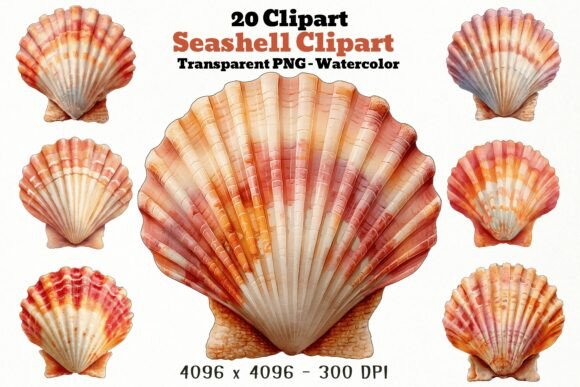
20 Seashell PNG Clipart: A Guide to High-Quality Coastal Design Assets
Creating authentic beach-themed designs requires more than just generic icons; it demands texture, warmth, and a sense of organic flow. The 20 Seashell PNG Clipart bundle offers a curated collection of watercolor illustrations designed specifically for creators who need reliable, high-quality assets for their projects. Whether you are designing summer invitations, coastal home decor, or custom sublimation prints, understanding how to leverage these digital files correctly can save you significant time and elevate the final aesthetic.
This set features twenty unique seashell illustrations rendered in warm coral, peach, cream, orange, and soft coastal tones. Each file is provided as a high-resolution PNG with a transparent background, ensuring seamless integration into both digital and physical media. However, many users overlook critical technical details when purchasing and using digital clipart, leading to frustrating results. By avoiding common pitfalls, you can maximize the value of this bundle and produce professional-grade work.
Understanding Resolution and Print Quality
One of the most frequent mistakes beginners make is ignoring resolution requirements. Digital screens and printers have vastly different needs. A graphic that looks crisp on a smartphone may appear pixelated and blurry when printed on a mug or a large poster. The 20 Seashell PNG Clipart set is delivered at 4096 x 4096 pixels with a 300 DPI (dots per inch) rating. This specification is crucial for high-quality printing.
If you attempt to stretch a low-resolution image beyond its intended size, you will lose detail and sharpness. For example, if you are creating a large wall art piece, ensure you do not upscale the image beyond its native dimensions without proper software interpolation. Conversely, for small items like stickers or planner pages, these high-resolution files provide ample room for scaling down while maintaining crisp edges. Always check your project’s required dimensions before placing the asset into your design software.
The Importance of Transparent Backgrounds
A common misunderstanding among new designers involves file formats. JPEGs often come with white backgrounds, which require tedious manual removal in editing software. This process is not only time-consuming but can also result in jagged edges or leftover artifacts that ruin the professional look of your design. The 20 Seashell PNG Clipart files come with transparent backgrounds, allowing you to layer the shells over any color, pattern, or photograph instantly.
To avoid issues, always verify that your design software supports transparency. When saving your final project, ensure you choose a format that preserves transparency, such as PNG or PDF, rather than flattening it into a JPEG prematurely. This flexibility is particularly useful for sublimation printing on dark or colored tumblers, where the shell needs to blend naturally with the base material without a harsh white box around it.
Color Harmony and Design Context
Another overlooked aspect is color coordination. The watercolor style of this bundle uses specific warm tones—coral, peach, and soft oranges. While these colors evoke a sunny, seaside vibe, they may not suit every design palette. A common error is forcing these warm-toned shells into a cool, blue-dominant nautical theme without adjusting the overall composition. This clash can make the design feel disjointed.
To create a cohesive look, consider using complementary colors in your background or text elements. For instance, pairing these warm shells with soft sandy beiges or muted teals can enhance their natural beauty. If your project requires a strictly monochromatic blue scheme, you might need to adjust the hue of the clipart using photo editing tools, though keeping the original watercolor texture intact is often the better choice for authenticity.
Licensing and Commercial Use
Before using any digital asset for business purposes, it is vital to understand the licensing terms. Many creators assume that purchasing a download grants unlimited rights, but this is not always the case. The 20 Seashell PNG Clipart is created for Creative Fabrica buyers, typically implying specific usage rights for personal and commercial projects. However, you should always read the specific license included with your download.
A frequent mistake is reselling the clipart files themselves. Most standard licenses allow you to use the graphics in end products—such as t-shirts, mugs, or invitations—but prohibit redistributing the raw PNG files. Ensure your final product adds significant value through your own design effort. For example, using a single shell as a minor element on a complex invitation layout is acceptable, but selling a pack of just these shells is not. Clarifying these boundaries protects your business from legal issues and respects the artist’s work.
Optimizing Workflow for Efficiency
Efficiency is key for freelancers and small business owners. Downloading and organizing files properly can save hours of work. Instead of searching for individual files each time you start a project, create a dedicated folder for your coastal assets. Label them clearly if necessary, although the consistent naming convention in this bundle usually suffices.
When working on multiple projects, such as a series of summer party invitations, use the variety in the 20 Seashell PNG Clipart set to maintain visual interest. Avoid repeating the same shell shape too frequently. With twenty unique illustrations, you can create dynamic compositions by mixing different sizes and orientations. Rotate and flip the images to create custom arrangements that look hand-drawn rather than templated.
Best Practices for Sublimation and Printing
For those using these graphics for sublimation on mugs and tumblers, preparation is essential. Ensure your canvas size matches the physical dimensions of the product. Since the files are high-resolution, they will print sharply, but color calibration between your monitor and printer can vary. Watercolor tones, being subtle, may appear differently on ceramic than on screen.
It is advisable to print a test sheet on regular paper first to check color accuracy and placement. Adjust brightness and contrast if needed, but try to preserve the delicate watercolor textures. Over-saturating the colors can make the shells look artificial and lose the soft, beachy appeal that makes this bundle attractive.
Final Considerations Before You Begin
Before diving into your next creative project, take a moment to assess your needs. Do you require vector files for infinite scalability, or are high-resolution raster images sufficient? For most print-on-demand and craft projects, the 4096 px PNGs in this set are more than adequate. However, for massive billboard-sized prints, you might need to tile images or use specialized upscaling techniques.
Remember that this is a digital download; no physical product will be shipped. Ensure you have a reliable backup system for your downloaded files. Cloud storage or external hard drives can prevent data loss, ensuring you always have access to your favorite design assets. By paying attention to these technical and creative details, you can transform the 20 Seashell PNG Clipart into stunning, professional-quality designs that resonate with your audience.